
If you’re buying a GPU for AI work in 2026 and want to stay under $500, get the NVIDIA RTX 5060 Ti 16GB. It’s built on NVIDIA’s newer Blackwell architecture, packs 16GB of VRAM, and its 5th-gen Tensor Cores (with native FP4 support) put it about 55% ahead of the older RTX 4060 Ti in memory bandwidth while using less power. Benchmarks put it around 42 tokens/sec on Llama 3 8B at Q4 quantization, and roughly 6.2 it/s on Stable Diffusion XL. That’s enough headroom for local LLMs, image generation, and day-to-day AI development without constantly hitting memory limits.
This guide walks through the best sub-$500 GPUs for AI in 2026, how NVIDIA stacks up against AMD and Intel, and which one actually fits your budget, whether you’re just starting, working on student projects, or doing this professionally.
What Is the Best GPU for AI Under $500?
For most people, the RTX 5060 Ti 16GB is the best all-around pick. Its 16GB of VRAM is enough to comfortably run 7B–13B parameter LLMs and handle Stable Diffusion XL. At the same time, full CUDA support means it works out of the box with PyTorch, TensorFlow, Ollama, LM Studio, and ComfyUI.
If your budget is closer to $250–$300, the RTX 3060 12GB remains the most recommended entry-level AI card in local-LLM communities. It’s older (Ampere architecture, slower raw compute), but 12GB of VRAM at that price is hard to beat, and CUDA compatibility means nothing you try will break.
Also Read: What is GPU as a Service
Why Does VRAM Matter for AI Workloads?
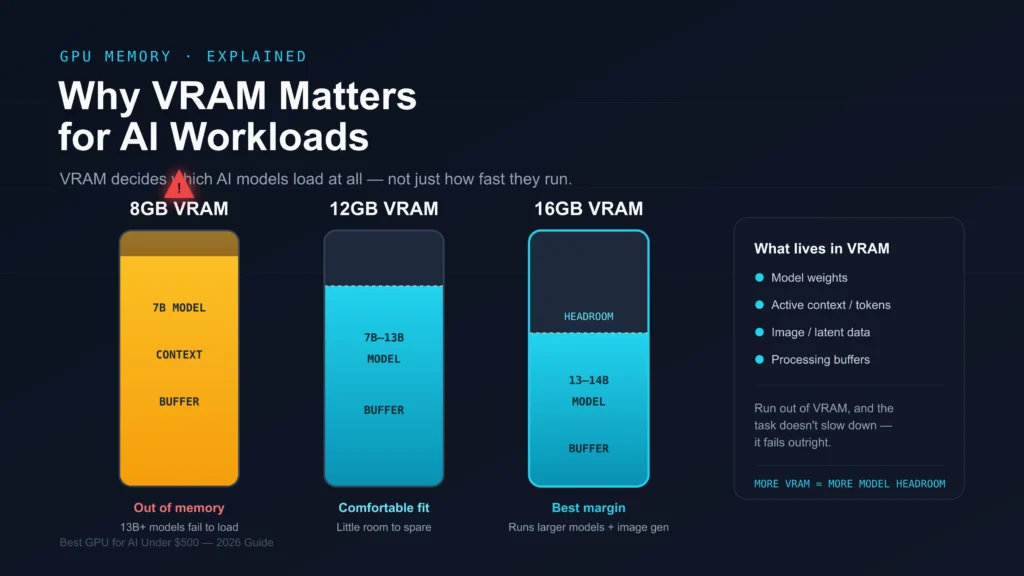
VRAM holds the AI model, the data being processed, and intermediate calculations while your GPU works. Run out of it, and a task doesn’t just slow down — it often fails outright with an out-of-memory error. For AI specifically, VRAM capacity usually matters more than raw compute speed, because it determines which model sizes you can load at all, not just how fast they run.
8GB vs 12GB vs 16GB VRAM:
8GB gets you through light AI tasks and 7B models at 4-bit quantization, but you’ll bump into memory limits fast, especially with anything image-related. 12GB is where things start feeling comfortable: most 7B–13B models and Stable Diffusion run without drama. 16GB is where I’d point most people buying under $500 in 2026; it gives you room for 13B 14B models, longer context windows, and image generation without babysitting your memory usage.
If your budget stretches to it, the jump to 16GB is worth it. At 4-bit quantization, that’s roughly the ceiling for 30B-class models when heavily compressed, versus 8GB, which realistically tops out around 7B.
Best GPU Under $500 — Comparison Table:
| GPU | VRAM | Price (2026) | AI Performance | Best For |
| RTX 5060 Ti 16GB | 16GB GDDR7 | ~$429–$479 | ~42 tok/s (Llama 3 8B, Q4); ~6.2 it/s SDXL | Local LLMs, best overall |
| RTX 4060 Ti 16GB | 16GB GDDR6 | ~$399–$449 | Slightly slower than 5060 Ti; 288 GB/s bandwidth | Stable value, older architecture |
| RTX 3060 12GB | 12GB GDDR6 | ~$200–$250 (used) | Slower compute, but full CUDA support | Beginners on a tight budget |
| Intel Arc B580 12GB | 12GB GDDR6 | ~$249–$289 | ~30–40% slower than NVIDIA in raw tok/s | Budget AI, Linux users comfortable with setup |
| RX 7800 XT | 16GB GDDR6 | ~$400 | Weaker AI software support (ROCm) | Gaming + light AI |
RTX 5060 Ti vs RTX 4060 Ti — Which Should You Actually Buy?
This is the comparison most people get stuck on, since the two cards are only about $30 apart in price.
The RTX 5060 Ti runs on NVIDIA’s newer Blackwell architecture, while the 4060 Ti is a generation older (Ada Lovelace). On paper, the difference looks small; both offer 16GB of VRAM, but the 5060 Ti’s memory bandwidth is 448 GB/s versus 288 GB/s on the 4060 Ti, a jump of about 55%. For AI workloads, bandwidth matters almost as much as VRAM capacity, because it determines how fast data moves between memory and the compute cores. In practice, that shows up as faster token generation on LLMs and quicker image steps in Stable Diffusion.
The 5060 Ti also picks up 5th-generation Tensor Cores with native FP4 support, which newer inference frameworks are starting to take advantage of for lower-precision, faster processing. Power draw is lower too, which matters if you’re running the card for long inference sessions or leaving a local LLM server up most of the day.
The honest case for the 4060 Ti is availability and price stability. It’s been out longer, so used and open-box units show up more often, and its pricing hasn’t been as affected by the 2026 VRAM shortage. If you find a 4060 Ti significantly cheaper than a 5060 Ti in your market, it’s still a perfectly capable card. But if the price gap is $30–$50, the 5060 Ti is worth it.
Also Read: Why Is My GPU Usage at 100% All the Time?
Real-World Use Cases: What Can You Actually Do With This GPU?
Specs are one thing; here’s what a 16GB card like the RTX 5060 Ti actually handles day-to-day.
Running a local chatbot or coding assistant. An 8B model like Llama 3 at Q4 quantization runs at roughly 40 tokens/sec on the 5060 Ti through Ollama, fast enough that responses feel close to instant for chat and code completion. You can keep the model loaded in the background and query it without noticeable lag.
Generating images with Stable Diffusion. SDXL runs at around 6.2 iterations per second on the 5060 Ti, which translates to a typical 512×512 or 768×768 image finishing in a few seconds at standard step counts. It’s not workstation-GPU fast, but it’s fast enough to iterate on prompts without long waits.
Fine-tuning small models. With 16GB of VRAM, light fine-tuning (LoRA-style adapters) on 7B–8B models is realistic, though full fine-tuning of larger models will still push past what this card can hold.
Multiple smaller tasks at once. 16GB gives you enough headroom to run a smaller LLM alongside a lightweight image tool without constantly hitting memory ceilings, something an 8GB card struggles with.
If your plans involve 30B+ models, agentic multi-model pipelines, or serious fine-tuning work, you’re outside what any sub-$500 card can comfortably do; that’s when a used RTX 3090 (24GB) or cloud inference starts making more sense.
Where AMD and Intel Actually Fit In:
NVIDIA dominates this list for a reason: CUDA is still the default for most AI tooling, but AMD and Intel aren’t irrelevant; they’re just a different trade-off.
Intel Arc B580 12GB is the best value-per-dollar card here at around $249–$289. It uses the SYCL backend to run Ollama on both Windows and Linux, and performance lands about 30–40% behind NVIDIA in raw tokens/sec. The real limitation isn’t the hardware; it’s software maturity. Tools like vLLM, most fine-tuning frameworks, and multimodal runtimes either don’t support Arc yet or require extra workarounds. If you’re experimenting and price-sensitive, it’s a genuinely good option. If you plan to use more advanced tooling down the line, you’ll likely hit friction.
AMD RX 7800 XT / RX 9060 XT cards offer competitive VRAM (16GB) at similar prices to NVIDIA’s cards, and are often the stronger pick for gaming. For AI specifically, ROCm support has improved a lot but still trails CUDA; expect more manual setup, occasional missing package support, and less community documentation to lean on when something breaks. If you’re already comfortable with Linux and don’t mind some troubleshooting, AMD is workable. For a first AI GPU, NVIDIA remains the easier path.
Is It Worth Waiting for Newer GPUs?
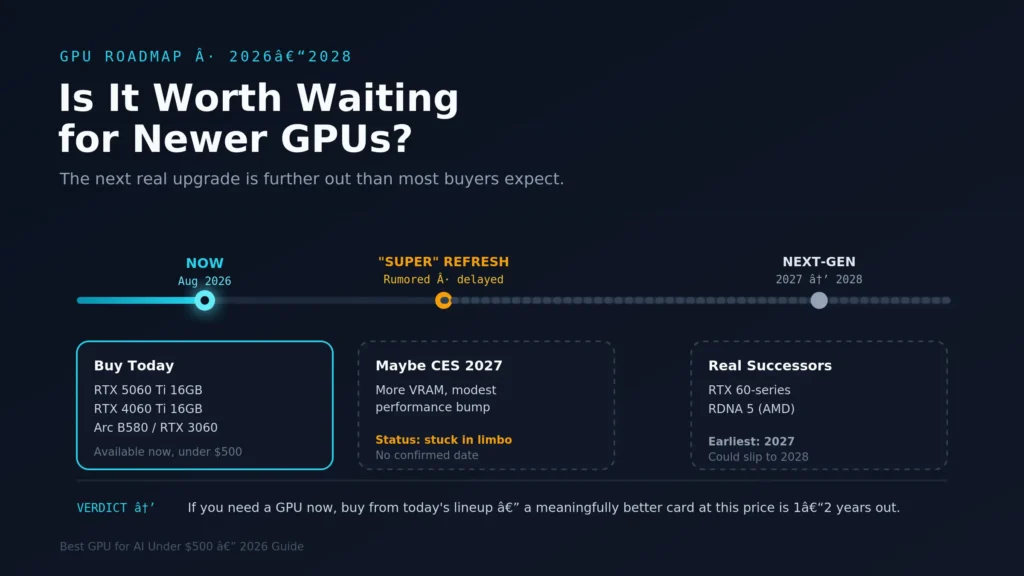
If you’re tempted to hold off for something better, here’s the honest timeline: NVIDIA’s rumored Super refresh, expected to bring more VRAM and a modest performance bump to this tier, has been delayed, with more recent signs pointing to a possible reveal around CES 2027. The next full generations from both NVIDIA (RTX 60-series) and AMD (RDNA 5) are further out still, realistically 2027 at the earliest and possibly later if VRAM supply issues continue.
In other words, if you’re waiting for a meaningfully better card at a similar price, you could be waiting a long while. For most people who need a GPU for AI work now, buying from the current lineup makes more sense than delaying another year-plus.
Your choice mostly comes down to how much VRAM you need and how much friction you’re willing to deal with in software setup.
- Prioritize VRAM first. If you plan to run local LLMs, do AI inference, or use generative tools like Stable Diffusion, aim for at least 12GB, ideally 16GB.
- Stick with NVIDIA if you want the smoothest experience. CUDA and Tensor Cores give NVIDIA cards the best compatibility with PyTorch, TensorFlow, Ollama, LM Studio, and ComfyUI, with the least setup hassle.
- Consider AMD or Intel only if you’re comfortable troubleshooting. ROCm (AMD) and OpenVINO/SYCL (Intel) support has improved but still requires more manual setup and has weaker support for tools like vLLM and fine-tuning frameworks.
- Check your power supply and cooling before upgrading; a 16GB card typically needs more headroom than an 8GB one.
Quick Buying Tips:
Choose 12GB or 16GB VRAM for meaningful AI performance.
Prefer NVIDIA GPUs with CUDA Cores and Tensor Cores for the easiest setup.
Confirm your GPU supports the specific AI software you plan to use.
Check your power supply’s wattage before buying.
Buy with some VRAM headroom for future, larger models.
Can You Run Local LLMs on a $500 GPU?
Yes. A 12GB or 16GB GPU can run most 7B models comfortably and many 13B models at 4-bit quantization. On the RTX 5060 Ti 16GB specifically, expect somewhere around 40 tokens/sec on an 8B model, fast enough for interactive chat, coding assistance, and writing tasks. If you need to run 30B+ models, you’ll need to look above the $500 range (a used RTX 3090 with 24GB VRAM is the common recommendation there).
Which GPU Is Best for Stable Diffusion Under $500?
The RTX 5060 Ti 16GB is the strongest pick for Stable Diffusion under $500 in 2026, handling SDXL at a solid pace thanks to its Tensor Cores and larger VRAM pool. If budget is the main constraint, the RTX 3060 12GB still produces good-quality images, just more slowly, and remains a common choice among beginners.
Are Budget GPUs Good for AI Image Generation?
Yes, as long as you pick one with enough VRAM. A card with at least 8–12GB can run tools like Stable Diffusion at a reasonable speed. It won’t match a $1,500+ GPU, but for learning, personal projects, and small-scale generation work, a budget card gets the job done.
Which AI Software Works Best with These GPUs?
NVIDIA GPUs have the broadest, most reliable support across Stable Diffusion, ComfyUI, Ollama, LM Studio, PyTorch, and TensorFlow, thanks to CUDA. AMD and Intel cards can run most of these tools too, but expect more setup steps and occasional compatibility issues.
- Ollama — A free tool for running AI language models locally. Works offline and keeps your data private.
- LM Studio — A free desktop app for downloading and chatting with AI models on your own machine, no internet required.
- Stable Diffusion — An AI image generator that turns text prompts into images, popular with artists, designers, and hobbyists alike.
New vs. Used GPU for AI:
A new GPU comes with a full warranty and the latest efficiency features, which matters if you’re running it for long stretches. A used GPU — especially something like a used RTX 3060 or RTX 3090 — can offer far better VRAM per dollar if you buy from a reputable seller and check its condition. For most first-time buyers, a new card in the 12–16GB range is the safer choice; for those chasing maximum VRAM on a budget, a carefully vetted used card is where the real value is.
NVIDIA vs AMD: Which Is Better for AI?
| Feature | NVIDIA | AMD |
| AI Performance | Best for deep learning and inference | Good for basic AI tasks |
| GPU Memory | 12GB–24GB VRAM widely available | Similar VRAM, fewer AI-specific optimizations |
| AI Training | Faster, thanks to CUDA and Tensor Cores | Supported, but slower in most frameworks |
| AI Inference | Excellent for local LLMs and chatbots | Fine for smaller projects |
| Software Support | Best-in-class for PyTorch/TensorFlow | ROCm is improving but still behind |
| Best For | Local LLMs, inference, generative AI | Gaming with light AI use on the side |
FAQ’s:
1. Is a $500 GPU good enough for AI?
Yes, a $500 GPU with 12–16GB VRAM handles local LLMs, Stable Diffusion, and small-to-medium machine learning projects well.
2. Can you train AI models with a GPU under $500?
You can train small-to-medium models and fine-tune existing ones. Full training of large models from scratch typically needs more VRAM than a sub-$500 card offers.
3. Should you choose NVIDIA over AMD for AI under $500?
For most people, yes. CUDA and Tensor Cores mean far less setup friction and broader tool support.
4. How much VRAM do you need for AI under $500?
12GB is a solid minimum; 16GB gives you meaningfully more room for larger models and image generation.
5. What should you look for in an AI GPU under $500?
High VRAM, CUDA support (if going NVIDIA), Tensor Cores, and confirmed compatibility with the specific tools you plan to use: Ollama, LM Studio, PyTorch, TensorFlow, etc.
6. Is the RTX 5060 Ti better than the RTX 4060 Ti for AI?
Yes, in most cases. The 5060 Ti has 55% more memory bandwidth and newer Tensor Cores, and typically costs only $30–$50 more. Unless you find a significant price gap in favor of the 4060 Ti, the 5060 Ti is the better buy.
7. Can a used GPU be a good choice for AI work?
Yes. A used RTX 3060 12GB or RTX 3090 24GB can offer far better VRAM per dollar than buying new. Just buy from a reputable seller, check for signs of heavy mining use, and confirm the warranty status before purchasing.
8. Does AMD work for AI, or should I stick with NVIDIA?
AMD cards can run most AI tools through ROCm, but expect more setup friction and less community support when troubleshooting. If you want the smoothest experience, NVIDIA is still the safer choice — especially for a first AI GPU.
9. How many parameters can a 16GB GPU realistically handle?
At 4-bit quantization, 16GB comfortably runs 13B–14B models and can push into 30B-class models when heavily compressed, though speed and quality trade-offs increase at that ceiling.
10. Is it better to buy now or wait for new GPUs in 2027?
If you need a GPU for AI work now, buying from the current lineup is the practical choice. Meaningful next-generation upgrades (RTX 60-series, RDNA 5) aren’t expected until 2027 at the earliest, and possibly later given ongoing VRAM supply constraints.
Conclusion:
If you can stretch to it, the RTX 5060 Ti 16GB is the smart buy right now; the VRAM, efficiency, and CUDA support all line up well for local AI work. Money tighter than that? Don’t feel bad about a used RTX 3060 12GB or the Arc B580. Plenty of people are running real workloads on both, and the VRAM difference matters more day-to-day than the extra speed you’d get from a pricier card. Whatever you pick, buy based on the models you actually plan to run, not the biggest number on the spec sheet.
Also Read: Is CAD Software CPU or GPU-intensive?