N-Body simulation on a GPU involves using a graphics card to compute interactions among many objects simultaneously. GPU is faster than CPU because it uses parallel processing, which handles thousands of calculations together instead of one by one. This makes simulations much quicker and more efficient.
This NBody Calculation on a GPU helps scientists and engineers perform high-speed physics simulations with remarkable accuracy and performance.
Why Does N-Body Benchmark Favor Older GPUs?
Older GPUs sometimes score higher in the N-Body benchmark because this test mainly measures raw parallel computing and floating-point performance (GFLOPS). N-Body simulations calculate particle interaction and gravitational forces in large particle simulations, which depend heavily on simple mathematical power.
Older GPU architecture was highly optimized for pure compute tasks used in scientific computing, GPU workloads, and high-performance computing (HPC). Newer designs like Ada Lovelace and RDNA 3 focus more on AI, ray tracing, and gaming features. In tests like the RTX 4090 benchmark or RX 7900 XTX performance, advanced features do not improve this specific workload.
Since N-Body uses tools like the CUDA Toolkit and focuses on compute efficiency, older GPUs can sometimes deliver surprisingly strong and consistent results.
How to Run N-Body Simulation on GPU?
To run an N-Body simulation on a GPU, you need a graphics card that supports CUDA or OpenCL. First, install the GPU toolkit and drivers. Then write your N-Body simulation code so calculations run in parallel on GPU cores instead of a CPU. Transfer particle data like mass, position, and velocity to GPU memory, run the compute kernel, and get results back. This method delivers faster performance, better efficiency, and handles large particle systems smoothly.
What Does the N-Body Benchmark Measure?
The N-Body benchmark measures how fast a computer’s CPU or GPU can calculate the movement and force between many particles at the same time. It is used in large particle simulations, scientific research, and high-performance computing (HPC).
This test checks GPU architecture strength, such as Ada Lovelace (RTX 4090 benchmark) or RDNA 3 (RX 7900 XTX performance). It shows how well a system handles compute-intensive tasks, physics workload acceleration, GPU optimization techniques, and simulation accuracy. A higher score means stronger real-world scientific computing GPU performance.
Learn More Here: Is Roblox CPU Or GPU Intensive
How Accurate is the GPU N-Body Benchmark?

The GPU N-Body benchmark is fairly accurate for testing how well a graphics card handles parallel calculations. It shows how fast a GPU can process many objects at the same time.
- Good for Parallel Performance Testing:
The GPU N-Body benchmark is accurate for checking how well a graphics card handles many calculations at the same time.
Example: If one GPU scores much higher than another, it means it can process more particles together faster.
- Tests One Specific Workload:
It mainly measures physics-based particle simulation, not full real-world tasks.
Example: A GPU may score high in N-Body but give average performance in gaming.
- Useful for Comparison:
It is reliable when comparing two GPUs under the same test conditions.
Example: If GPU A gets 120 FPS and GPU B gets 80 FPS in N-Body, GPU A is stronger in parallel computing.
- Not a Complete Performance Test:
It does not measure ray tracing, AI tasks, or memory-heavy workloads.
Example: For video editing or 3D rendering, other benchmarks give a clearer picture.
- Best Used with Other Benchmarks:
For accurate buying decisions, combine N-Body results with gaming and productivity benchmarks.
This gives a more complete and trustworthy performance understanding.
Is CUDA Faster Than OpenCL for N-Body?
For N-Body simulations, CUDA is usually much faster than OpenCL on NVIDIA GPUs because it is designed specifically for NVIDIA hardware. It delivers high performance, stability, and efficient parallel computing, while OpenCL works across multiple platforms but is slightly slower on NVIDIA cards.
| Feature | CUDA | OpenCL |
| Performance on NVIDIA GPUs | Significantly faster | Slightly slower |
| Optimization | High (vendor-specific, efficient) | Moderate (cross-platform flexibility) |
| Ease of Setup | Simple with CUDA Toolkit | Manual configuration required |
| Hardware Support | NVIDIA only | AMD, Intel, and NVIDIA compatible |
In short:
CUDA gives maximum speed, stability, and optimization for NVIDIA GPUs.
OpenCL provides flexibility for running on different hardware, but with lower performance on NVIDIA hardware.
Pro Tip: For heavy particle simulations, choosing CUDA can save time and computing resources while maintaining accuracy.
What is the Best GPU for N-Body in 2026?
In 2026, the best GPU for N-Body simulations combines high FP32 performance, large memory, and stable cooling. These GPUs excel in high-performance computing (HPC) and scientific computing GPU tasks, handling large particle simulations and compute-intensive physics workloads with precision.
| GPU Model | Architecture | FP32 Performance | Memory (GB) |
| NVIDIA RTX 4090 | Ada Lovelace | ~83 TFLOPS | 24 GB |
| NVIDIA RTX 4080 | Ada Lovelace | ~49 TFLOPS | 16 GB |
| AMD RX 7900 XTX | RDNA 3 | ~61 TFLOPS | 24 GB |
Why these GPUs dominate N-Body simulations:
- Powerful FP32 performance ensures fast, accurate physics workload acceleration
- Large VRAM and high memory bandwidth support large particle simulations
- Efficient cooling maintains stability for long, compute-heavy tasks
- Proven RTX 4090 benchmark and RX 7900 XTX performance make them top choices
- Optimized for GPU optimization techniques and maximum simulation accuracy
These GPUs are perfect for researchers, engineers, and developers seeking fast, reliable, and high-precision computation. Investing in them means unmatched speed and efficiency in N-Body simulations.
How to Optimize CUDA Kernels for N-Body?
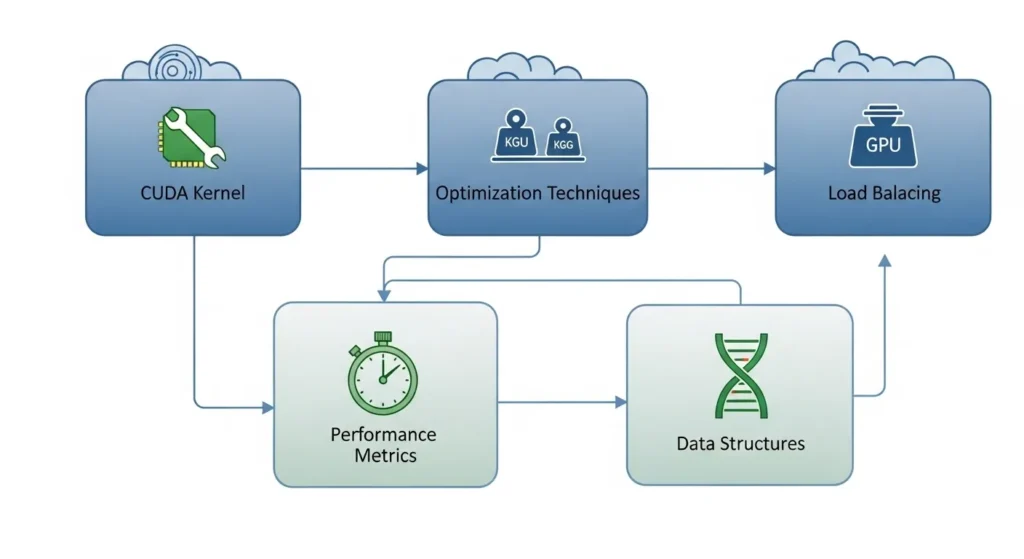
Optimizing CUDA kernels helps maximize GPU performance and reduce lag in simulations.
Best optimization tips:
- Use Shared Memory: Store nearby particle data locally to reduce memory delays and speed up computations.
- Optimize Thread Blocks: Use 128–256 threads per block for better GPU balance and maximum parallel efficiency.
- Reduce Operations: Apply fused multiply-add (FMA) and precompute constants to cut unnecessary calculations.
- Balance Precision: Use FP32 for fast performance or FP64 for high accuracy, depending on simulation needs.
- Loop Unrolling & Coalesced Access: Minimize loops and access global memory efficiently to boost kernel performance.
- Thread Synchronization: Carefully sync threads to avoid race conditions and maintain accurate results.
This method ensures your N-Body CUDA kernels run faster, smoother, and more accurately, perfect for real-world simulations.
GPU or CPU: Which Is Better for Physics?
| Feature | GPU (Graphics Processing Unit) | CPU (Central Processing Unit) |
| Best For | Large-scale computational physics and simulations | Complex logic and detailed calculations |
| Processing Power | Uses thousands of cores for multi-threaded GPU computing | Uses fewer cores with strong single-core power |
| Performance Testing | Strong results in GPU workload tests and performance benchmarking of GPU tools | Better in single-thread performance tests |
| Real-Time Use | Ideal for real-time physics rendering and hardware acceleration | Good for game logic and control systems |
| Hardware Example | High-power AMD GPU compute units handle massive data fast | Advanced CPUs manage step-by-step processing |
| Stress Handling | Works well with GPU stress test software for heavy workloads | Stable under long CPU processing tasks |
A GPU is powerful and efficient for large simulations, hardware acceleration, and heavy computational physics tasks. It delivers faster results in parallel calculations.
A CPU is reliable and precise for smaller, complex, step-by-step physics problems.
What Are Real-World Uses of N-Body GPU Simulation?
Real-world uses of N-Body GPU simulation include astronomy research, space exploration, physics modeling, game physics engines, and particle simulations. Scientists use GPU acceleration to study galaxy formation and gravitational forces. Developers use it for realistic visual effects. This powerful computing method delivers fast, accurate, large-scale calculations in real-world applications.
Learn More Here: Is Fallout 4 CPU Or GPU Intensive
Conclusion:
N-Body Calculation on GPU is a powerful method for running fast, accurate physics simulations using massive parallel computing. It measures real GPU compute performance and helps compare hardware for scientific computing and HPC tasks. While older GPUs may excel in raw benchmarks, modern GPUs deliver balanced performance. For best results, combine N-Body testing with real-world workload benchmarks.
FAQ’s:
1. Is the GPU faster than the CPU for N-Body simulation?
Yes, a GPU is usually faster because it can process many calculations at the same time using parallel computing, while a CPU handles tasks one by one.
2. Why is GPU good for N-Body simulation?
GPU is good because N-Body simulation needs many repeated calculations, and the GPU can handle thousands of operations in parallel, making it very efficient.
3. Can the CPU run an N-Body simulation?
Yes, CPU can run it, but it is slower compared to GPU, especially when dealing with a large number of objects.
4. Where is N-Body simulation used?
It is used in physics, astronomy, gaming, and scientific research to simulate motion and interaction between particles or objects.
5. What is the main advantage of a GPU in simulations?
The main advantage is speed, as a GPU reduces computation time by handling multiple calculations at once.