
Your CPU’s number of threads depends on how many cores it has and whether it supports Hyper-Threading or SMT. Usually, one core can handle one or two threads. For example, a 4-core CPU may have 4 or 8 threads. You can easily check your CPU threads in Task Manager, system settings, or the CPU’s official website.
In this guide, we will explain how to find out how many threads your CPU has and why this information matters for your system’s performance.
What Are CPU Threads and How Do They Impact Performance?
To find out how many threads your CPU has, check its specifications. A CPU thread is the smallest unit of execution, and modern processors often use “hyper-threading” technology. This allows each core to run two threads simultaneously, improving performance. To see the number of threads, use tools like Windows Task Manager or software such as CPU-Z. This gives you detailed and accurate information about your processor’s capabilities.
How to Find Out the Number of Threads in Your CPU:
To find out the number of threads in your CPU.
Follow these simple steps:
- For Windows: Open Task Manager (Ctrl + Shift + Esc). Go to the “Performance” tab, select “CPU”, and you’ll see the “logical processors” count. This is your CPU thread count, which indicates how many threads per CPU core your system has.
- For Mac: Click the Apple logo, select “About This Mac”, then “System Report”. Under “Hardware”, look for the “Total Number of Cores” (which includes threads).
This simple method helps you understand your CPU performance threads, whether you’re using Intel vs AMD thread count or checking multithreading in CPUs.
Understanding thread vs core CPU and Hyper-Threading technology can improve how you analyze your CPU’s capabilities for multitasking or high-performance tasks.
Also Read: How to Check Node CPU Utilization in OpenShift?
Why CPU Threads Matter for Multitasking and Speed:
CPU threads are critical for multitasking and improving system speed. More CPU threads allow your CPU to handle multiple tasks at once, enhancing overall performance, especially for demanding tasks like gaming, video editing, and running multiple applications simultaneously. With a higher CPU thread count, your system becomes faster and more efficient, reducing lag and improving responsiveness. This makes multitasking smoother and more efficient.
- CPU Threads Explained: CPU threads represent individual tasks that a CPU can manage at once. More threads per CPU core means better multitasking and faster task execution.
- Improved Multitasking: More threads allow your CPU to efficiently manage several tasks at once, enabling seamless multitasking without slowdowns.
- Increased Speed: With additional threads, your CPU processes tasks faster, enhancing system responsiveness, particularly for high-performance tasks like video editing or gaming.
- Smoother Performance: More threads result in reduced lag and better CPU performance, leading to faster completion of tasks and smoother multitasking.
- Efficiency Boost: Multithreading in CPUs optimizes your CPU’s usage, allowing tasks to be completed more efficiently and reducing wait times.
- Advanced Technology: Technologies like Hyper-Threading technology allow your CPU to simulate extra threads, increasing performance for demanding applications.
Understanding the Difference Between CPU Cores and Threads:
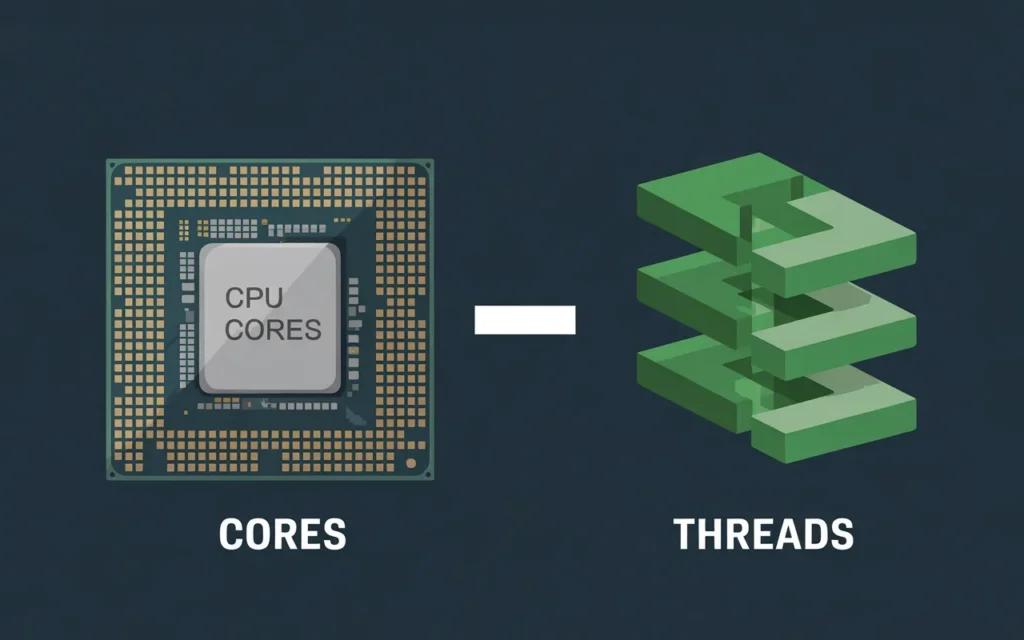
CPU cores are the physical units inside your processor that perform tasks. Each core is capable of handling one task at a time. On the other hand, CPU threads are virtual units that allow each core to process multiple tasks simultaneously. This is especially useful in multithreading on CPUs.
A multi-core processor with hyper-threading technology can significantly improve CPU performance by running more tasks faster and more efficiently. This is why understanding the difference between cores and threads is important when choosing the right CPU for activities like gaming, work, or multitasking.
| Term | Definition | Function |
| CPU Cores | Physical processing units in a CPU. | Execute tasks. Each core handles one task at a time. |
| CPU Threads | Virtual units that allow each core to handle multiple tasks simultaneously. | Enables each core to handle multiple tasks at once, boosting multitasking performance. |
Key Difference:
- CPU Cores are the physical units in the processor that perform computations, making them the primary factor in determining a processor’s overall power.
- CPU Threads are virtual units that allow cores to run multiple tasks at once, improving overall efficiency and CPU performance.
- Understanding this thread vs core CPU distinction helps in selecting the right processor for your needs, especially when comparing Intel vs AMD thread count to find the optimal choice for your requirements.
How Many Threads Does Your CPU Need for Gaming?
For gaming, your CPU should have at least 4-6 threads for smooth performance. Ideally, a CPU with 8-12 threads offers better multitasking, especially for modern games. More threads mean better CPU performance, handling tasks like AI and physics. When choosing a CPU, consider its thread count, clock speed, and architecture. Both Intel and AMD offer powerful CPUs with Hyper-Threading for improved gaming, but be aware of the difference between cores and threads.
Also Read: Can I Use Cpu Cable For Gpu?
The Role of Threads in CPU Performance: A Simple Explanation:
The Role of Threads in CPU Performance
What Are Threads in CPUs?
Threads are smaller tasks that a CPU handles simultaneously. Think of them as individual workers on a team, each performing different parts of a job. The CPU thread count refers to how many threads the CPU can handle at once.
How Threads Improve CPU Performance:
Having more threads means better multitasking and faster processing. CPU threads help manage various tasks without slowing down. For instance, while browsing, watching videos, and listening to music, threads allow the CPU to manage everything efficiently. This boosts overall CPU performance and prevents lag during tasks like gaming or multitasking.
Example:
Consider playing a game. One thread might manage the graphics, while another handles game logic. This efficient use of multithreading in CPUs ensures smooth gameplay without delays or interruptions.
Additional Concepts:
- Threads per CPU core: A CPU core can have multiple threads, improving its ability to handle tasks.
- Thread vs core CPU: A core is a physical part of the CPU, while a thread is a virtual path for processing tasks.
- Intel vs AMD thread count: Different processors, like Intel and AMD, handle CPU threads differently, affecting overall performance.
- Hyper-Threading technology: This Intel technology allows each core to handle two threads at once, improving multitasking.
How to Maximize the Power of Your CPU Threads:
To maximize the power of your CPU threads, use software that supports multi-threading, which allows the CPU to process multiple tasks at once. Close unnecessary background apps to free up resources. If needed, upgrade your hardware for a faster CPU or more threads. Optimize settings like power management and cooling to avoid overheating, ensuring the CPU runs smoothly. This will boost overall performance and efficiency, especially for gaming or heavy tasks.
Are More CPU Threads Always Better for Your Computer?
More CPU threads can improve your computer’s performance, but they’re not always better. If you mainly use programs like web browsers or word processors, more threads won’t make a noticeable difference.
Extra CPU Threads = Better Performance for Heavy Tasks:
- Example 1: Video Editing When you’re editing videos, more CPU threads help your computer handle multiple tasks at once (like rendering, applying effects, etc.). This speeds up the process, making it smoother and faster.
- Example 2: Gaming. In modern games with high-quality graphics and complex mechanics, more threads can make games run smoother. It helps your computer process graphics and physics simultaneously for a more immersive experience.
More Threads Aren’t Always Needed for Light Tasks:
- Example 1: Web Browsing – If you’re browsing the web or checking emails, you don’t need many threads. A few threads are enough for these simple tasks, and extra threads won’t make a noticeable difference.
- Example 2: Word Processing – Writing in Word or similar programs doesn’t require many threads. Your CPU won’t be working hard enough to need more than a couple of threads.
Conclusion: More threads improve performance in heavy tasks like gaming or video editing, but for everyday use like browsing or word processing, they’re not necessary. So, the answer depends on what you do with your computer.
What Happens If Your CPU Doesn’t Have Enough Threads?
If your CPU doesn’t have enough threads, its performance will drop, especially when running multiple programs at once. Threads are like small tasks your CPU can handle simultaneously. A higher thread count improves multitasking and performance, while fewer threads can cause lag. To get smoother performance, especially for gaming or heavy tasks, CPUs with more threads, such as those using Hyper-Threading, are a better choice.
Also Read: Is 4000RPM Too Low For CPU Fan?
Tips for Choosing a CPU with the Right Number of Threads:
When choosing a CPU, it’s important to consider the number of threads based on your needs. More CPU threads help with multitasking, video editing, gaming, and heavy software. For basic tasks like web browsing, fewer threads are enough.
Understand your usage:
- For simple tasks (browsing, word processing), a CPU with fewer threads (4-6) is sufficient.
- For gaming or multitasking, a CPU with 6-8 threads ensures better performance.
- Consider heavy tasks:
Video editing, 3D rendering, and software development require 8+ threads for smooth CPU performance.
- Budget balance:
More threads usually mean higher cost. Choose based on your budget and requirements. More threads improve multithreading in CPUs, but only if you need them.
- Future-proofing:
If you plan to upgrade in the future, investing in a CPU with 12-16 threads can keep your system relevant for longer.
Difference between cores and threads:
Threads per CPU core allow better management of tasks. Intel vs AMD thread count can vary, so choose according to the workload. Hyper-Threading technology (in Intel) allows one core to handle two threads, improving efficiency.
Conclusion:
In summary, the number of CPU threads directly impacts multitasking and performance. For heavy tasks like gaming and video editing, more threads improve speed and efficiency, while fewer threads may suffice for everyday use. Choose your CPU based on your needs and future requirements.
FAQ’s:
1. Does every CPU have multiple threads?
No. Not every CPU has multiple threads. Older or budget CPUs may have only one thread per core. Modern CPUs usually support multiple threads using a feature called Hyper-Threading (SMT), which helps the CPU do more work at the same time.
2. Can a CPU have more threads than cores?
Yes. A CPU can have more threads than cores. For example, a 4-core CPU can have 8 threads. This happens when each core handles two threads simultaneously, improving multitasking and performance for heavy tasks.
3. Do more CPU threads improve performance?
Yes. More CPU threads can improve performance, especially for multitasking, gaming, video editing, and rendering. Threads allow the CPU to handle multiple tasks together. However, performance also depends on software support and CPU speed.
4. How can I check how many threads my CPU has?
You can check CPU threads easily. On Windows, open Task Manager, go to Performance > CPU, and look for “Logical processors.” You can also use tools like CPU-Z or check your CPU model on the manufacturer’s website.
5. What is the difference between CPU cores and threads?
CPU cores are physical units that do the actual work. Threads are virtual paths that allow each core to handle more tasks simultaneously. In simple terms, cores are workers, and threads are extra hands that help them work faster.